Introduction to Active Learning Glide
Active Learning Glide combines traditional Glide SP docking with state-of-the-art deep learning to efficiently screen ultra-large compound libraries.
Building Machine Learning (ML) Models
Selecting Compounds for Active Learning
Background
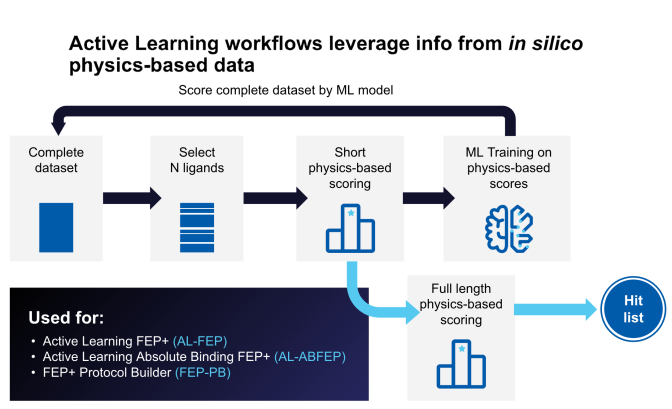
Active Learning Glide combines Glide's high-performance ligand-receptor docking with Schrödinger’s state-of-the-art deep learning to efficiently screen ultra-large compound libraries.
Active Learning Glide is built on the premise that given docking scores for a sufficient number of ligands, an Machine Learning (ML) model can “learn” to recognize features in the ligand structures that can be predictive of the docking score. This trained model can be used to predict the docking scores of ligands outside the training set without needing to dock them first. This method exploits the computational efficiency of ML evaluation (ML evaluation in the Schrodinger Suite is roughly 1000x faster than Glide docking) to allow screening of ultra-large libraries (+ 1BLN ligands) in a reasonable amount of time.
Building Machine Learning (ML) Models
ML models in Active Learning Glide are built using the DeepAutoQSAR package inside Schrodinger Suite. DeepAutoQSAR optimizes the parameters of many types of ML models (hyperparameters) and constructs an ensemble of three best-performing models. Every model is trained to a different pool of data “fold”. The program will continue hyperparameter search until a sufficient number of models have been reached or a predetermined stop time has been reached.
Types of models: DeepAutoQSAR considers traditional ML models and neural network models from deep-learning. The following classical models are considered: Random Forest, XGBoost. The following neural network models are considered: Graph Convolutional (GCNN), Fully-Connected Convolutional.
Selecting Compounds for Active Learning
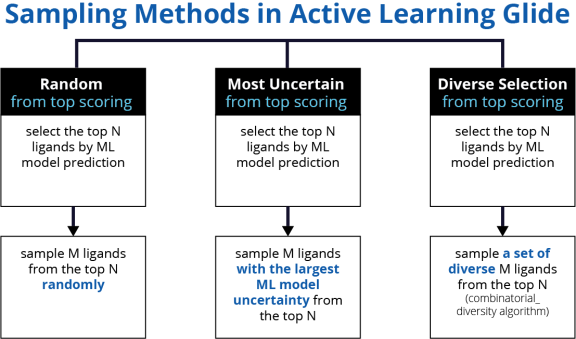
In the first iteration, a random selection of ligands is made. These ligands are docked with Glide and form the initial training set for ML training. For subsequent iterations, we bias selection toward ligands that score well using the ML-model score over the entire library. This is done to improve model performance where it matters the most - at the very top of the ranked list.
Pilot Mode vs. Glide
Active Learning Glide trains ML models to the docking scores of ligands and not to any experimental binding affinity. When evaluating the Active Learning Glide workflow as a substitute for large brute force docking, we want to see how well the workflow captures the very best ligands in the library according to Glide. Using pilot mode in AL-Glide we can answer this question using a slice of the screening library called the pilot library. The pilot library is run through a single iteration of the Active Learning Glide workflow. In parallel, the pilot library is docked fully using Glide SP.
Pilot Report example
Report Interpretation
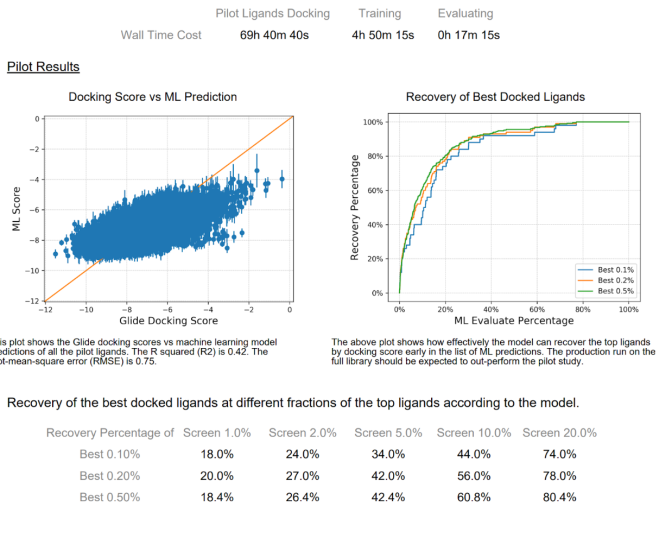
A PDF report is generated after a pilot run of Active Learning Glide. There are two plots that are shown. The first (left hand side) is a scatter plot of the ML score (docking score prediction) vs the true Glide docking score. There will typically not be a strong quantitative relationship between these two variables. An R^2 value > 0.3 is a good sign that the model is able to learn the Glide score. The most important analysis is represented in the plot on the right side of the report. Here we look at enrichment of the best compounds in the pilot library by the ML model. In virtual screening, we typically care about recovery at the very top of the list. A model with modest correlation can show excellent early enrichment of top scoring compounds. We see this in the example report above. Ultimately, the enrichment problem is really a ranking problem and not a regression problem. Therefore, we find the enrichment plot to be the single most important analysis of the pilot results. The enrichment of the productive runs is expected to be better than the pilot run, as there is a larger training set typically being used in the former.
Additionally, there is an HTML report file available for all active learning workflows. This report summarizes the workflow execution status, results, and analysis, and can be downloaded during execution.
-
Workflow chart: Provides a high-level view of the workflow execution. Each stage (select, score, train, evaluate) is color-coded to indicate status (running, completed or failed). Arrows indicate the sequence of steps across iterations.
-
Stage details: Each stage also include mini flowchart with sub steps and relevant parameters, helping you understand how ligands are selected, scored and evaluated.
-
Property distributions (Histograms): Histograms of selected ligands show the distribution of properties such as molecular weight, logP, TPSA, and charge, typically comparing the full library with ligands selected in each iteration; similar distributions indicate good coverage of chemical space, while strong shifts may suggest model bias toward certain properties.
-
PCA Plots: Principal Component Analysis (PCA) plots visualize ligand diversity based on molecular fingerprints, where a broad spread indicates good coverage of chemical space and tight clustering may indicate reduced diversity.
-
Model Performance: The report also includes model performance metrics such as R², MAE, RMSE, and correlation, which are expected to improve across iterations, as well as enriched substructures that highlight chemical motifs associated with top-performing ligands.
Together, these components help assess both the quality of the model and the progression of the active learning workflow.