Exchanging Structures with KNIME Using the KNIME-Maestro Connector Node
You can transfer structures with their properties to the Maestro Project Table from a KNIME workflow, perform some tasks on the structures in Maestro, such as changing the structure or adding properties, and then transfer them back to KNIME. This is done via KNIME-Maestro Connector nodes in the KNIME workflow and a lightweight server that listens for connections from a KNIME workflow. A license is not required to use this feature.
To set up the connection:
-
Start Maestro.
-
Click the Tasks button and browse to Project Table and Project Operations → Establish Structure Exchange with KNIME.
The Structure Exchange with KNIME panel opens. It might be docked into the Workspace or a separate panel, depending on your Maestro preferences. At the top of the panel are Start and Stop buttons for starting and stopping the server that performs the exchange.
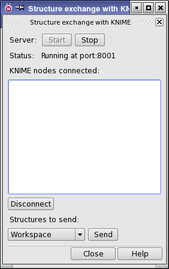
Figure 1:The Structure Exchange with KNIME panel.
-
Click Start to start the KNIME-Maestro connection server.
-
Start KNIME and load the workflow you want to run.
The workflow must contain a KNIME-Maestro connector node.
When you are done with exchanging structures, you can click Stop to shut down the server.
To exchange structures between KNIME and Maestro:
-
Execute the KNIME-Maestro connector node to send structures to Maestro.
The structures are added to the Project Table.
-
Perform whatever actions you want on the structures.
-
In the Structure Exchange with KNIME panel, choose the source of structures from the Structures to send option menu.
-
Select or include the relevant structures.
-
Select the node in the KNIME nodes connected list that you want to send the structures to.
-
Click Send.
When a connector node is run, the input structures to that node are added to the Project Table in the open Maestro session, and the node is added to the KNIME nodes connected list. Execution of the node waits until you send structures back to it from Maestro, by selecting the node in the list and clicking Send. If the node has no input, when it is executed it waits until you send structures from Maestro to it. Once the structure has been sent, the node is automatically disconnected. You can also disconnect the node manually if no structure is needed from Maestro, by selecting it in the list and clicking Disconnect.