Constrained Energy Minimization Opcodes
The opcodes in this section are linked below:
DRIV — carry out a geometry DRIVe
SUBS — define a SUBStructure for subsequent minimization
ASL1 — ASL expression for substructure
ASL2 — ASL expression for fixed and frozen atoms
ASL3 — ASL expression for fixed and frozen ligand atoms in Embrace calculations
DRIV — carry out a geometry DRIVe
When included in a BGIN/END loop the DRIV command drives the specified geometric parameter through a set of fixed values. The parameter can be a dihedral angle, a bond angle, or a bond distance. The DRIV command should be followed by a MINI (not an ELST) to evaluate the energy. The driving process involves adjusting the specified geometric parameter to the starting value and then setting a constraint with a large force constant (1000 kJ/mol) for that parameter. Then an energy minimization is carried out, and in the next pass through the BGIN/END loop the parameter is incremented by the value of arg7 and the process repeated. When the final value of the parameter (arg6) is reached or surpassed then a “grid” of energy values is written to a .grd file. This grid can be displayed as a contour map in Maestro (see Plotting Coordinate Scan Results); its format is described in Format of MacroModel .grd Files.
You can have two consecutive DRIV commands to select two geometric parameters. You must specify the same type of parameter for each command: one angle and one distance is not an allowed combination. The inner loop runs over the parameter specified by the second DRIV command. Two DRIV commands are needed to calculate data for a Ramachandran-type plot.
Note: This opcode is incompatible with the use of DEBG 23.
|
arg1-4 |
Atom numbers |
|
These define the geometric parameters to be driven. They must be valid atom numbers in the filename
|
|
|
arg5 |
Starting value |
|
This does not need to be the current value in the filename |
|
|
arg6 |
Final value |
|
The drive finishes when the parameter is greater than or equal to this value if arg7 is positive, or when the parameter is less than or equal to this value if arg7 is negative. |
|
|
arg7 |
Increment value |
|
The increment must be nonzero. If arg7 is greater than zero then arg5 must be smaller than arg6, otherwise the drive would never terminate. Similarly, if arg7 is less than zero, arg5 must be greater than arg6. |
|
|
The actual number of steps is given by the formula: |
|
|
N= ABS(arg5−arg6)/arg7 +1 |
|
|
The maximum allowable value of N is 100. In the usual use of the |
|
|
arg8 |
Constraint Force Constant |
|
0 |
Use the default value of 1000 |
|
> 0 |
Use this value |
|
Units for the force constant vary with type of drive: kJ mol-1 Å-2 for distances, kJ mol-1 radian-2 for angles, and kJ mol-1 for torsions. |
SUBS — define a SUBStructure for subsequent minimization
Arg1-4 are atom numbers of the substructure: those atoms that are allowed to move without restriction in the environment of anchored atoms. This command is normally used with FXAT commands, which restrain the position of atoms at the periphery of the substructure. The substructure and associated FXAT commands are commonly produced using the substructure editor of Maestro. There are two principal reasons to do this:
-
To “tether” part of a molecule in space. This is ordinarily done using FXAT commands but no
SUBScommands. -
To save computing time by ignoring part of the system believed to be irrelevant. If both
SUBSand FXAT commands appear, then atoms that are not specified in either command are completely ignored in the simulation.
Note: When SUBS and FXAT commands appear together, any interaction except a stretch consisting only of FXAT atoms is eliminated, provided the following conditions hold:
- The FXAT atoms in question are not specified by any
SUBScommand. - The flat-bottom half-width is zero for all the FXAT atoms concerned.
- Neither DEBG
17nor DEBG28is specified.
The elimination of these interactions saves time, since FXAT atoms will not move much; however, stretches are always included since without them the “fixed” atoms tend to adopt unrealistic relative positions even for rather high tethering potentials.
If a SUBS command appears in the .com file with a zero-valued first argument, then MacroModel looks for a file named filename.sbc, in which it expects to find SUBS, FXAT, ASL1, ASL2, and ASL3 commands. This file can be produced either manually or using Maestro. ASL1, ASL2 and ASL3 commands must be added manually. Additional SUBS commands with atom numbers can be used to direct additional atoms to be added to the set in the .sbc file.
A typical use of both SUBS formats simultaneously might be simulating the binding of a large molecule to a list of small molecules. The .sbc file would define the substructure and fixed atoms for the large molecule. The first SUBS command in the .com file would have a zero-valued first argument and would set up the substructure for the large molecule. Subsequent SUBS commands would include the small molecules in the simulation. The input data files for each job would contain the large molecule first, ensuring that its numbering scheme, like that in the .sbc file, remains constant over the series of runs.
If a negative number is given for any of arg1 through arg4, then the entire molecule containing that atom number is defined as a part of the substructure. For MBAE calculations a .sbc file should be used to specify the substructure.
SUBS commands with nonzero first arguments must come after READ commands. SUBS commands with zero first arguments must come before READ, because the .sbc file is read during structure file reads.
|
arg1 |
Substructure atom number |
||||||
|
0 |
Obtain information from
|
||||||
|
> 0 |
Atom number.
|
||||||
|
arg5 |
Add/Delete atoms |
||||||
|
0 |
Default, add the atoms listed to the substructure. |
||||||
|
−1 |
Remove the atoms listed from the substructure. |
ASL1 — ASL expression for substructure
Specify ASL syntax for a substructure. This command is intended to make it easier to set up standardized substructures that can be reused in different calculations on different molecular systems.
Note: This special command can only be used in substructure (.sbc) files: it cannot be used in command (.com) files.
The format of this command is similar to that of regular opcodes, starting with a 4-character string. The first argument is a floating-point number that has the same meaning as arg5 of SUBS, and the second argument is a string.
|
arg1 |
Add/Delete atoms |
|
0 |
Add the atoms defined by the ASL expression to the substructure. (Default) |
|
−1 |
Remove the atoms defined by the ASL expression from the substructure. |
|
arg2 |
ASL expression |
|
See the Maestro Command Reference Manual for information on ASL syntax. |
ASL2 — ASL expression for fixed and frozen atoms
Specify ASL syntax for fixed and frozen atoms, similar to the FXAT opcode. This command is intended to make it easier to set up standardized substructures that can be reused in different calculations on different molecular systems.
Note: This special command can only be used in substructure (.sbc) files: it cannot be used in command (.com) files.
The format of this command is similar to that of regular opcodes, starting with a 4-character string. The optional first argument is a 4-digit integer, the second argument is a 7-digit floating-point number, and the third argument is a string, separated by single spaces. Space must not be left on the line for the first argument if it is not given.
|
arg1 |
Half-width for flat-bottomed constraint (optional) |
|
> 0 |
Specify the half-width in units of 0.1 Å of the flat-bottom section of the constraint for the atoms defined by the ASL expression. This is defined in the same way as arg4 of FXAT. |
|
arg2 |
Fix or freeze atoms |
|
> 0 |
Specify the force constant in kJ mol−1 Å−2 for the atoms defined by the ASL expression, which are “fixed” atoms. |
|
−1 |
Freeze the atoms defined by the ASL expression. |
|
arg3 |
ASL expression |
|
See the Maestro Command Reference Manual for information on ASL syntax. |
ASL3 — ASL expression for fixed and frozen ligand atoms in Embrace calculations
Specify ASL syntax for fixed and frozen ligand atoms in Embrace calculations, similar to the FXAT opcode. This command is intended to make it easier to set up standardized substructures that can be reused in different calculations on different molecular systems.
Note: This special command can only be used in substructure (.sbc) files: it cannot be used in command (.com) files.
The format of this command is similar to that of regular opcodes, starting with a 4-character string.The optional first argument is a 4-digit integer, the second argument is a 7-digit floating-point number, and the third argument is a string, separated by single spaces. Space must not be left on the line for the first argument if it is not given.
|
arg1 |
Half-width for flat-bottomed constraint (optional) |
|
> 0 |
Specify the half-width in units of 0.1 Å of the flat-bottom section of the constraint for the atoms defined by the ASL expression.This is defined in the same way as arg4 of FXAT. |
|
arg2 |
Fix or freeze atoms |
|
> 0 |
Specify the force constant in kJ mol−1 Å−2 for the atoms defined by the ASL expression, which are “fixed” atoms. |
|
−1 |
Freeze the atoms defined by the ASL expression. |
|
arg3 |
ASL expression |
|
See the Maestro Command Reference Manual for information on ASL syntax. |
FXAT — FiX ATom
Fix or freeze the position of the atom given in arg1. We use the term “fix” to mean “tether in place using a constraint”; thus “fixed” atoms can move. We use the term “frozen” to denote “rigidly freeze in place.” Frozen atoms cannot move at all.
This command is generally used with the SUBS command to fix or freeze the positions of certain atoms at the periphery of the substructure being minimized. See the description of the SUBS command for a description.
When doing substructure (SUBS) calculations with FXAT restraints having no free flat bottom region (arg4 = 0), interactions wholly involving the fixed atoms, other than stretches, are eliminated from the interaction array unless DEBG 17 or 28 is set. This is primarily to improve the speed of the computation; when the force constant is large, as it is by default, the FXAT constraints, together with the stretch interactions, maintain reasonable local geometries.
The constraint potential, Ec, for a fixed atom is calculated using the equation

where 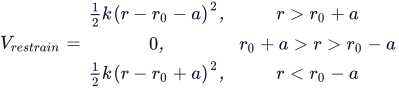 , R is the current position and R0 is the desired position (arg6-arg8), k is the force constant (arg5), and σ is the half-width of the flat-bottomed potential (arg4).
When using low force constants to “gently” constrain atomic positions, local geometries become unreasonable unless debug switch 17 is set. Also, unless mutual interactions between FXAT atoms are active, solvation energies for systems involving FXAT have no absolute meaning, although comparisons between conformers are still meaningful.
When using FXAT commands in molecular dynamics (e.g., doing substructure molecular dynamics), it is appropriate to use substantially reduced force constants (arg5, e.g., 50-100) so that realistic flexibility and rapid thermal equilibration is possible.
If two FXAT commands specify the same atom, the second replaces the first.
A FXAT command must come after READ commands.
Note that for MBAE calculations, FXAT commands should be placed in a .sbc file.
|
arg1 |
Fixed atom number |
||||||||||||||||||||||||
|
0 |
Clear or modify fixed and/or frozen atom constraints, depending on the values of the other arguments. A typical use for this facility is in homology modeling, when one might want to perform a minimization with frozen or “tight” fixed constraints, then repetitively diminish the constraints and reminimize. When arg1 is 0, the other args are interpreted as follows. If the
|
||||||||||||||||||||||||
|
> 0 |
Specify fixed or frozen status for the atom specified; this can override a previous specification for the same atom.
|
FXDI — FiX DIstance
This command supplies energetic restraints to interatomic distances. This command provides flat-bottom energetic restraint wells, in which there is no penalty for limited user-defined deviations from the equilibrium distance. This command is useful for restraining energy minimizations and molecular dynamics simulations to geometries with desired internuclear proximities (e.g., from NOE experiments).
The constraint potential, Ec, for a fixed distance is calculated using the equation

where

 , Ri and Rj are the positions of the atoms i and j that define the distance, d0 is the desired position (arg6), k is the force constant (arg5) and σ is the half width of the flat-bottomed potential (arg7).
Note: With hydrogens bound to carbon in force fields MM2 and MM3, the restraint is applied between the van der Waals positions of the hydrogen (e.g., with a (C)H in MM2, the hydrogen is treated as if it were at a position shifted 8.5% of the C-H bond length toward the C).
If two FXDI commands specify the same atoms, the second replaces the first.
Note that for MBAE calculations, FXDI commands should be placed in a .sbc file.
|
arg1 |
Atom 1 |
|
0 |
Clear all existing |
|
arg2 |
Atom 2 |
|
arg4 |
Nonbonded control |
|
1 |
The corresponding nonbonded interaction is eliminated from the interaction array. Used to allow fixed distances for atoms which are close in space. |
|
arg5 |
Force constant in kJ mol−1 Å−2 (default 100.0)· |
|
arg6 |
Desired distance (Å) |
|
0 |
Use initial value. |
|
> 0 |
Use this value. |
|
arg7 |
Half-width of flat bottom part of the potential well |
FXBA — FiX Bond Angles
This command supplies energetic restraints to planar angles defined by the locations of triplets of atoms.
The constraint potential, Ec, for a fixed bond angle is calculated using the equation
where θ is the current bond angle, θ0 is the desired bond angle (arg6), and k is the force constant (arg5).
If two FXBA commands specify the same bond angle, the second replaces the first.
Note that for MBAE calculations, FXBA commands should be placed in a .sbc file.
|
arg1 |
Atom 1 |
|
0 |
Clear all existing |
|
arg2 |
Atom 2 |
|
arg3 |
Atom 3 |
|
arg5 |
Force constant (default = 100 kJ/mol·rad2) |
|
arg6 |
Desired nonzero angle (degrees) |
|
0 |
Use initial value. |
|
> 0 |
Use this value. |
|
arg7 |
Half-width of flat bottom well (degrees). |
FXTA — FiX Torsion Angles
This command is used for restraining dihedral angles defined by the position of quartets of atoms. Such wells, particularly when the flat-bottomed option is used, are useful when minimizing crude structures in which some approximate torsional angle is known (e.g., from NMR coupling constants) but an exact value is not available. They are also useful in molecular dynamics to prevent major conformational changes without affecting the local conformational trajectory of the simulation. Using arg7=0.0, the same simple restraint in MacroModel to fix a torsion angle at arg6 is used.
The constraint potential, Ec, for a fixed torsional angle is calculated using the equation

If two FXTA commands specify the same torsional angle, the second replaces the first, unless arg8 is nonzero.
Note that for MBAE calculations, FXTA commands should be placed in a .sbc file.
|
arg1 |
Atom 1 |
|
0 |
Clear all existing |
|
arg2-4 |
Atoms 2-4 |
|
arg5 |
Force constant k in kJ/mol (default: 1000) |
|
arg6 |
Desired torsion angle, in degrees |
|
<360 |
Use this value. |
|
>360 |
Use the initial value. |
|
arg7 |
Half-width of flat bottom in degrees |
|
0 |
A standard 1-fold cosine well will be used. |
|
arg8 |
Multiplicity |
|
> 1 |
Allows specification of several allowed ranges for the same set of torsion angles, using a method described by Sefler et al. [29]. If arg8 is two, for example, ranges around two dihedral angles can be specified in order to enforce constraints obtained from analysis of NMR coupling constants by means of the Karplus equation. In this example, two |
FXCO — FiX COnstraints
Generates a series of FXTA torsional constraints with flat bottoms to hold the input structure in its starting conformation. This opcode must come after any SUBS opcodes that are present and after the READ opcode that reads the structure for which these constraints are to be generated.
|
arg1 |
Mode selection |
|
0 |
FXTA for all torsions. |
|
1 |
FXTA for all but double bonds. |
|
2 |
FXTA for all but bonds between sp2 atoms. |
|
arg2 |
Clear prior constraints |
|
0 |
No (default) |
|
1 |
Yes |
|
arg5 |
Force constant |
|
Default: 1000. |
|
|
arg6 |
Angular half-width |
|
Default: 60. |
FXHB — FiX Hydrogen Bonds
Generates a series of distance (FXDI) and angle (FXBA) flat-bottomed constraints to constrain the geometry of hydrogen bonds.
|
arg1 |
Donor Atom |
||||
|
0 |
Constrain all hydrogen bonds. Possible hydrogen bonds are restricted to:
|
||||
|
> 0 |
Donor atom number. If arg1 > 0, then:
|
||||
|
arg5 |
H–A distance constraint value |
||||
|
The half-width of the flat-bottomed constraint is set to 0.5 Å |
|||||
|
0 |
use 1.85 Å |
||||
|
−1 |
use the current value |
||||
|
> 0 |
use this value |
||||
|
arg6 |
D-H-A angle constraint value |
||||
|
The half-width of the flat-bottomed constraint is set to 30°. |
|||||
|
0 |
use 180° |
||||
|
−1 |
use the current value |
||||
|
> 0 |
use this value |
Note: The H–A–R angle is not constrained.