Interactions Toolbox
noncovalent bond, contact, pi interaction, hydrogen bond, H-bond, halogen bond, pi-pi stacking, pi interactions, pi-cation, salt bridge, clash
The Interactions toolbox is used for displaying or hiding H-bond, halogen bond, salt bridge, contact, and pi interaction markers, and setting the colors for the markers.
To open this toolbox, move the pointer to the Interactions button on the Workspace Configuration toolbar, and click the … button that appears above it.

- Using
- Features
- Additional Resources
Using the Interactions Toolbox
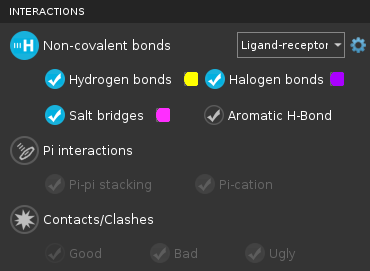
This toolbox allows you to show or hide three types of nonbonded interactions: noncovalent bonds, pi interactions, and contacts and clashes. Each of these types has subtypes that can be shown or hidden independently. You can thus hide any of the basic interaction types while preserving the state of the subtypes. Each of these interaction types also has an menu from which you can choose the atom sets to be used for the interaction (the default is Ligand-receptor) and a settings button to restrict the scope of ligand-receptor interactions.
-
To display markers for a particular interaction, click the button for the interaction type and then select the option for the interaction.
-
To change the color of the markers for a particular interaction, click the color button next to the option for the interaction, and choose a new color.
-
To define the atom sets between which to display interactions, choose an item from the option menu for the interaction type.
-
To add properties to the project for the count of occurrences of each interaction, click Create Property and select the interaction types in the dialog box that opens.
-
To set the parameters that define each interaction type, open the Preferences Panel and use the tools in the Nonbonded interactions section.
Interactions Toolbox Features
The toolbox has three sections, for the three different kinds of non-bonded interactions. Each section has the same layout and types of controls.
- Display buttons and options
-
The display buttons and options control which interaction types are displayed in the Workspace. The button at the top of each section can be used to turn on and off all interaction markers of that type. The individual options can be used to control which specific interactions are shown.
The display options are also available in the Pose Viewer panel (with a different appearance).
- Color buttons
-
These buttons allow you to set the color of the marker for each specific interaction. Clicking the button opens a standard color selector in which you can set the color. The chosen color is displayed on the color button.
- Interacting atom set option menu
-
This option menu allows you to choose the atom sets for which the interactions are displayed:
- Ligand-Receptor—Display interactions between the ligand molecule (or molecules) and the receptor. The receptor can be a protein, DNA, or RNA.
- Antibody-Antigen—Display interactions between the antibody and the antigen. Only available with Maestro BioLuminate.
- Intra-Ligand—Display interactions within the ligand molecule (or molecules, if there is more than one ligand molecule).
- All—Display interactions between all molecules.
- Other—Define the sets of interacting atoms. Opens the Define interaction Atom Sets dialog box, in which you can specify one or more interacting groups of atoms, or "pairings". You can define a single atom set, if you want to display interactions within this set; or you can define one or more pairings of two atom sets, if you want to display interactions between these two sets in each pairing. A banner is displayed in the Workspace with instructions for picking atoms for the sets. For example, if you have several complexes with aligned binding sites, you can show just the interactions between each receptor and its own ligand, by defining each complex as a pairing, with the receptor as one atom set in the pair and the ligand as the other.
- Load Selection—Capture the current Workspace selection and use it as the atom set for interactions. The selection is converted to an ASL expression and applied to the Other interaction definition. Interactions persist after the Workspace selection is cleared. Not available when no atoms are selected.
- Scope settings button
-
Set the scope of the ligand-receptor interactions. Displays a menu to choose the scope:
- All Available—display interactions between all available ligands and receptors, i.e. do not limit the scope.
- Same Entry Only—display interactions between the ligand and receptor within an entry but not between entries.
- Same Group Only—display interactions between ligands and receptors that are from entries in the same group. If the group for one entry contains the group for another entry, they are considered to be in the same group.
- Apply to All Interactions—apply this choice to all three interaction classes, so that the scope setting is the same on all scope settings menus.
This button is only available when you choose Ligand-receptor from the interacting atom set option menu.