Status Bar
The Status Bar provides information about the structures in the Workspace. It is divided into several sections.
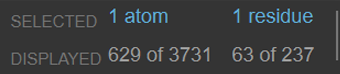
The fixed area on the left of the status bar shows the selected, displayed, and total atoms and residues within the Workspace. These values are updated as the selection changes. Residue information is not given in the Materials Science profile.

When the pointer is not over an atom or ribbon, the area on the right summarizes the Workspace contents by the total number of atoms, residues, chains, molecules, entries and formal charge. In the Materials Science profile, chain and residue information is missing, but information is given on repeat units in polymers.

When the pointer is over an atom, the area on the right gives information about the atom, such as the element, PDB name, charge, chirality, unpaired electrons (dots), and location within the structure (entry name and number). When the pointer is over a ribbon, information is given on the alpha carbon for the residue represented by that part of the ribbon.
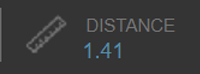
When two, three, or four sequentially bonded atoms are selected, a measurement of the bond length, angle, or dihedral is displayed to the right of the selection section. If you hover over this section, the measurement markers are displayed in the Workspace. If you double click this section, a measurement is created and added to the Measurements Toolbox. This section is hidden if there is not enough space to display the other two sections.