Query Materials Project Database Panel
Query the database of the Materials Project for structures that match a set of criteria. The structures are downloaded and can be incorporated into the project.
To open this panel: click the Tasks button and browse to Materials → Tools → Query Materials Project Database.
The following licenses are required to use this panel: MS Maestro
- Using
- Features
- Additional Resources
Using the Query Materials Project Database Panel
To query the Materials Project database, choose an option for the query and set it up, enter your API key, and run the job. The structures returned from the query can be incorporated into the project, by choosing an incorporation option in the Job Settings Dialog Box. For information on obtaining an API key, see https://materialsproject.org/api.
To write out the input file and a script for running the job from the command line, click the arrow next to the Settings button  and choose Write.
When using the database search from this panel, the following citations should be used (see https://materialsproject.org/about/cite).
A. Jain*, S.P. Ong*, G. Hautier, W. Chen, W.D. Richards, S. Dacek, S. Cholia, D. Gunter, D. Skinner, G. Ceder, K.A. Persson (*=equal contributions). The Materials Project: A materials genome approach to accelerating materials innovation. APL Materials, 2013, 1(1), 011002. doi:10.1063/1.4812323
S. P. Ong, S. Cholia, A. Jain, M. Brafman, D. Gunter, G. Ceder, K. A. Persson. The Materials Application Programming Interface (API): A simple, flexible and efficient API for materials data based on REpresentational State Transfer (REST) principles. Computational Materials Science, 2015, 97, 209–215. doi:10.1016/j.commatsci.2014.10.037
Query Materials Project Database Panel Features
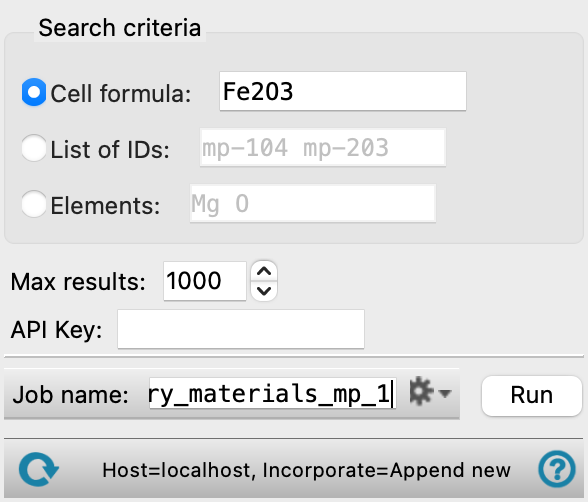
- Search criteria options and text boxes
-
Specify the query for the search by one of the following methods. Each text box has an example of the format of the search terms.
- Cell formula—search by the given reduced cell formula of the material.
- List of IDs—specify a list of structure IDs from the Materials Project database to download.
- Elements—search for structures that contain the specified list of elements.
- Max results text box
-
Specify the maximum number of results to return.
- API Key text box
-
Specify the key for access to the API. The key is masked by default; select Show API Key to display its value. For information on obtaining an API key, see https://materialsproject.org/api. Current (32 characters) API keys are supported.
- Show API Key option
-
Select this option to display the API key in plain text. By default, the key is masked.
- Job toolbar
-
Manage job submission and settings. See Job Toolbar for a description of this toolbar.
The structures returned from the query can be incorporated into the project, by choosing an option in the Job Settings Dialog Box.
The Job Settings button opens the Query Materials Project Database - Job Settings Dialog Box, where you can make settings for running the job.
- Status bar
-
The status bar displays information about the current job settings and status for the panel. The settings includes the job name, task name and task settings (if any), number of subjobs (if any) and the host name and job incorporation setting. The job status can include messages about job start, job completion and incorporation.
Use the Reset button
 to reset the panel to its default settings and clear any data from the panel.
 The status bar also contains the Help button
 , which opens the help topic for the panel in your browser. If the panel is used by one or more tutorials, hovering over the Help button displays a
  button, which you can click to display a list of tutorials (or you can right-click the Help button instead). Choosing a tutorial opens the tutorial topic.