Desmond Files
composite model system, CMS, multisim, MSJ, config, cfg
.cfg, .cpt, .ene, trj, multisim
This section details all of the potential input/output files that are associated with Desmond simulations (particularly those run with Multisim). This is intended to serve as a basic description of what’s contained in each file, without in-depth consideration for their usage in the workflow.
To understand how to use input files as a part of running a workflow, see Running Desmond. For an overview of analysis scripts that extract information from output files, see the relevant sections in Desmond Utilities.
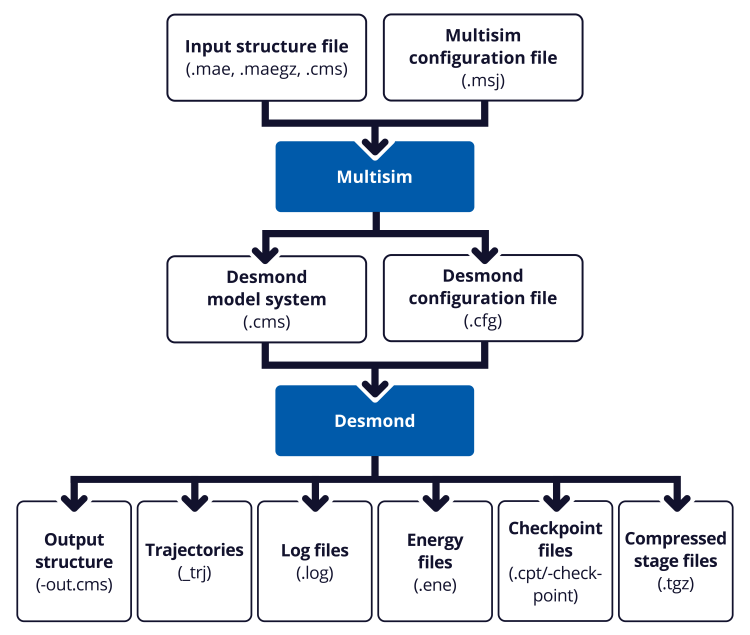
The following is a graphical representation of how the various input and output files fit into the workflow. Click on a box to learn more about it.
Input Files
Desmond simulations have two input files that users should interact with: the composite model system file (CMS) and the multisim configuration file (MSJ).
When running jobs from Maestro, you usually do not need to be concerned with these files. You can write them out if you want to run jobs from the command line. First make all the settings in the panel, and make host settings in the Job Settings Dialog Box, then click the Job Settings button arrow and choose Write. The .cms, .msj, and .cfg files are written, as well as a script to run the job.
Output Files
A Desmond simulation run from Maestro produces a number of output files. The following files are returned from a simulation job: