Fukui Functions
Fukui functions represent the changes in the molecular electron density upon addition or removal of charge. While the atomic Fukui indices (see Atomic Fukui Indices) are convenient to use because they are simply scalar values for each atom, they are somewhat less well-defined than Fukui functions because they are only based on the MO coefficients for the frontier orbitals for the N-electron system. Thus, they do not consider relaxation of the full charge density when the molecular charge is changed. In contrast, Fukui functions account for relaxation of the density and are dependent upon actual charge perturbations. But because they are functions, rather than discrete numbers, they must be visualized as isosurfaces or as property maps in Maestro.
Fukui functions are calculated by Jaguar in a finite-difference approach as follows:

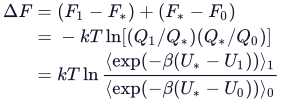
where N is the number of electrons in the reference state of the molecule, and δ is a fraction of an electron, which must be positive. The value of δ used by default in Jaguar is 0.01 electron. This value has been shown to give results which are comparable to those obtained with a differential approach [263] for small molecules. Furthermore, when using DFT, the finite difference method used by Jaguar retains the effect of the N-derivative of the DFT exchange-correlation potential, whereas the differential method proposed in Ref. [263] neglects this. For small molecules the neglect seems justifiable, but for larger molecules it might not be. In any case, the value of δ may be controlled using the fukui_delta keyword.
The calculation of both Fukui functions requires explicit calculation of three different charge states for the molecule. The Python script, fukui.py runs all three calculations and generates the Fukui functions, which can be visualized in Maestro as a surface.
In addition, Jaguar calculates the Fukui function for radical attack, which is simply the average of the Fukui functions for electrophilic and nucleophilic attack,

To set up a Fukui function calculation from Maestro, choose click the Tasks button and browse to Quantum Mechanics → Fukui Functions. The panel that opens allows you to select the input structures and make some keyword settings—see Jaguar - Fukui Functions Panel for more information. Because the calculation of Fukui functions involves changes in the electron density, no other properties may be calculated except for atomic charges (the atomic Fukui indices for the N-electron system are calculated automatically), and you should use preoptimized structures as input, since geometry optimization cannot be combined in the same job as Fukui functions. By default, B3LYP/LACVP*+ is used for calculating Fukui functions. This default gives broad coverage of the periodic table, and is a fast and robust method, which is important for automatic treatment of N+δ systems where SCF convergence can be challenging.
The script generates six .vis files for each structure: three for the electron densities of the N, N+δ, and N-δ systems, and three for the f−, f+, and f0 Fukui functions, defined above. These volumes are imported into the Project Table when the job is incorporated.
There are two ways to visualize a Fukui function: either as an isosurface, or as a mapping onto an isosurface of some other property, such as the density. To view the surfaces, you can click the S button in the Title column; the Surface Manager Panel opens, in which you can select and display the surfaces, and perform the surface mappings.
When you view a Fukui function by itself as an isosurface, the red and blue regions correspond to negative values and positive values, respectively. Positive values (blue) for f− correspond to regions that lose electron density when the molecule acts as a nucleophile or undergoes electrophilic attack, and positive values (blue) for f+ correspond to regions that gain electron density when the molecule itself acts as an electrophile or undergoes nucleophilic attack. In other words, the positive (blue) regions are those that are most nucleophilic or electron donating for f− and the most electrophilic or electron accepting for f+.
You can choose to map the Fukui function onto the electron density isosurface (which is readily available since it is calculated by the script), and choose from various color schemes to represent the range of numerical values on the surface. Then the color for the positive values indicates the most nucleophilic or electrophilic regions, depending on the Fukui function you map.
In addition to the surfaces, the Löwdin populations of the Fukui functions and the minimum and maximum values of the Fukui functions on the density isosurface for each atom are added to the Maestro file as atom properties.