Review FEP+ Protocol Builder Results Panel
View the results of a FEP+ Protocol Builder job.
To display these results, open the FEP+ Protocol Builder Panel, select View Results in the Task options at the top of the panel, then choose the results directory of a completed job.
- Using
- Features
- Additional Resources
Using the Review FEP+ Protocol Builder Results Panel
After you load the results of a completed job, the panel displays the performance of the sampled protocols and the parameters of the top protocols.
Use the Performance Convergence bar chart to see how the RMSE of the top protocols improves over the active learning rounds. Select a protocol, either by clicking a bar in the chart or a row in the Final Top Protocols table, to display its parameters in the Protocol Parameters table. You can then open a correlation plot for the protocol, send it to the FEP+ Panel, or export its parameters.
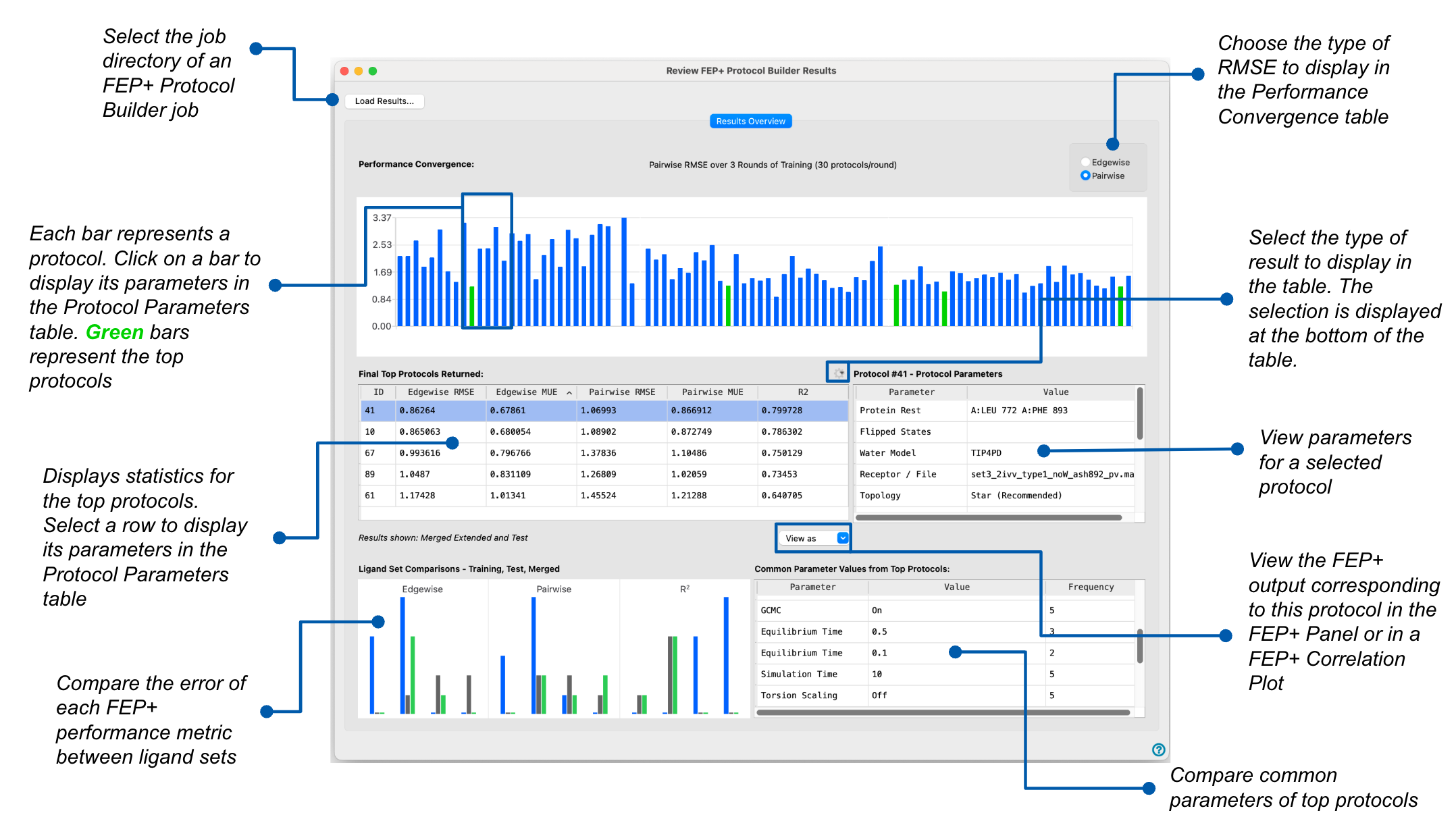
Review FEP+ Protocol Builder Results Panel Features
- Task options
- Performance Convergence section
- Final Top Protocols table
- Protocol Parameters table
- Correlation Plot button
- Send to FEP+ button
- Shared Parameters link
- Ligand Set Comparisons link
- Task options
-
Choose the task to perform. The choice determines what is displayed in the rest of the panel.
- Build & Test Protocols—Set up and run an FEP+ Protocol Builder job. The job-setup controls are displayed.
- View Results—View the results of a completed FEP+ Protocol Builder job. Choose the results directory from the dropdown, which lists recently opened directories, or browse to a new one. The results are displayed in the panel.
- Performance Convergence section
-
The bar chart displays the RMSE of the top protocols in each round of the active learning cycle. Use the Metrics to display options to change the RMSE type shown on the vertical axis. A missing bar signifies that the FEP+ calculation using that protocol has failed. Click a bar to display its protocol parameters in the Protocol Parameters table. The final top protocols are shown in green, and listed in the Final Top Protocols table.
Note:
If any edges fail to produce a predicted ΔG during any step, the map is not counted, and the following message is displayed: "Cannot analyze map due to missing edge data. Some edges may have failed." In this event, statistical information for that model, such as RMSE and MUE values, can still be viewed in the output.
- Final Top Protocols table
-
This table displays statistics of the top protocols that have been run on both the training and test set. Select a row to display its protocol parameters in the Protocol Parameters table. Click a column header to sort the table by the values in that column.
- Edgewise RMSE—the RMS error of the predicted affinities with respect to the experimental values for the free energy change of directly-connected edges in the graph.
- Edgewise MUE—the mean unsigned error of the predicted affinities with respect to the experimental values for the free energy change of directly-connected edges in the graph.
- Pairwise RMSE—the RMS error of the predicted affinities with respect to the relative free energy change for all ligand or mutant pairs.
- Pairwise MUE—the mean unsigned error of the predicted affinities with respect to the relative free energy change for all ligand or mutant pairs.
- R2—value of the fit of predicted to experimental affinities.
- Select run button menu
-
Select the run from which results are displayed in the Final Top Protocols table. See the Protocol Builder workflow for more information.
- Merged Extended and Test—the final error data from the merged maps of running the protocol on the training and test set.
- Test Phase—the protocols run with an extended production time on the test set.
- Extended Simulation—the protocols run with an extended production time on the training set.
- Initial Simulation—the protocols run with a shortened production time on the training set.
- Results shown text
-
The run selected from the Select run button menu is displayed as noneditable text.
- Protocol Parameters table
-
Displays the parameters of the protocol selected in the Performance Convergence section or the Final Top Protocols table. The protocol number is shown in the table heading. See the parameter table for more information on the parameters. These parameters form the optimal protocol for your system, as determined by the FEP+ Protocol Builder, and can be used to perform prospective FEP+ calculations.
- Correlation Plot button
-
Click to open the Correlation Plot (FEP+) Panel for the selected protocol, which shows a plot of experimental against predicted ΔG with errors indicated, a list of statistics, and a histogram of ΔΔG errors. Only available when a protocol is selected.
- Send to FEP+ button
-
Click to open the FEP+ Panel and load the map file (
.fmp) of the selected protocol, along with its settings. You can then review the ligand data and the perturbation map, and view analyses of the results of the perturbation calculations. Only available when a protocol is selected. - Shared Parameters link
-
Click to open the Parameters Shared by Top Protocols pane. Parameters whose value is the same across two or more protocols in the Final Top Protocols table are listed. The Frequency column shows how many protocols in the Final Top Protocols table have the value shown in the Value column.
- Ligand Set Comparisons link
-
Click to open the Ligand Set Comparisons pane, which shows histograms of the Edgewise RMSE, Pairwise RMSE, and R2. The counts of the Training, Test, and Merged sets are compared side by side. Hover over a bar to display more information.