Selecting Hydrogen Atoms
When selecting hydrogen atoms, it is often useful to select only the polar hydrogens or the nonpolar hydrogens. This capability is supported in a number of ways:
-
Predefined hydrogen sets: There are several predefined sets of hydrogen atoms that include polar and nonpolar hydrogens for various structures, such as ligands and proteins. These are available in the Select Objects pane. See Selecting Predefined Atom Sets for more information.
-
Custom sets or atom queries: You can create your own set or query that selects hydrogens with your own choice of restrictions. See Creating Complex Atom Selections for more information.
-
Exclude nonpolar hydrogens option: The selection scope can be modified to exclude nonpolar hydrogen atoms from the selection, so only the polar hydrogens are selected. The modified scope applies to selection of predefined sets, expansion of the selection, and selection from the Structure Hierarchy. It does not apply to Workspace picking or to the hydrogen sets in the Select Objects pane. Using this option does not affect the existing selection, only actions taken after the option was set.
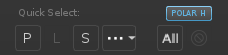
To set this option, choose Select → Exclude Nonpolar Hydrogens. The changed scope is indicated by a button labeled polar h in the Quick Select section of the toolbar. To return to selecting all hydrogens, click this button; the button is removed from the toolbar.
Selecting hydrogen atoms is also useful when you are building a 3D structure by adding fragments. If there is a single heavy atom selected, pressing Tab moves the selection to the nearest hydrogen atom (in terms of number of bonds distant). You can then build from this atom. See Building Structures from Fragments for more information. If there are multiple hydrogens at the same distance, pressing Tab selects the most recently added (highest atom number). Once the selection has moved, pressing Tab again rotates the selection through hydrogens that are attached to the same heavy atom as the selected hydrogen.