Polymer Chain Analysis Panel
Calculate properties of selected polymer molecules from one or more MD simulations, averaged over the selected molecules and the trajectory. The properties include persistence length, radius of gyration, principal axes, and orientational order parameter.
To open this panel: click the Tasks button and browse to Materials → Classical Mechanics → Trajectory Analysis → Polymer Chain Analysis Calculations.
The following licenses are required to use this panel: MS Maestro
- Overview
- Using
- Features
- Additional Resources
Overview of Polymer Chain Analysis Calculations
Persistence length
The persistence length is calculated with the following expression:

where ⟨h2⟩ is the mean squared end-to-end distance, L0 is the extended chain length, and LP is the persistence length. The end-to-end distance is calculated for each selected chain in each trajectory frame, and the values are averaged over the entire trajectory. The persistence length, in angstroms, is added to the output structure as a Maestro property, Persistence Length (Ang.). The structure is returned as a .cms file.
Internal distance
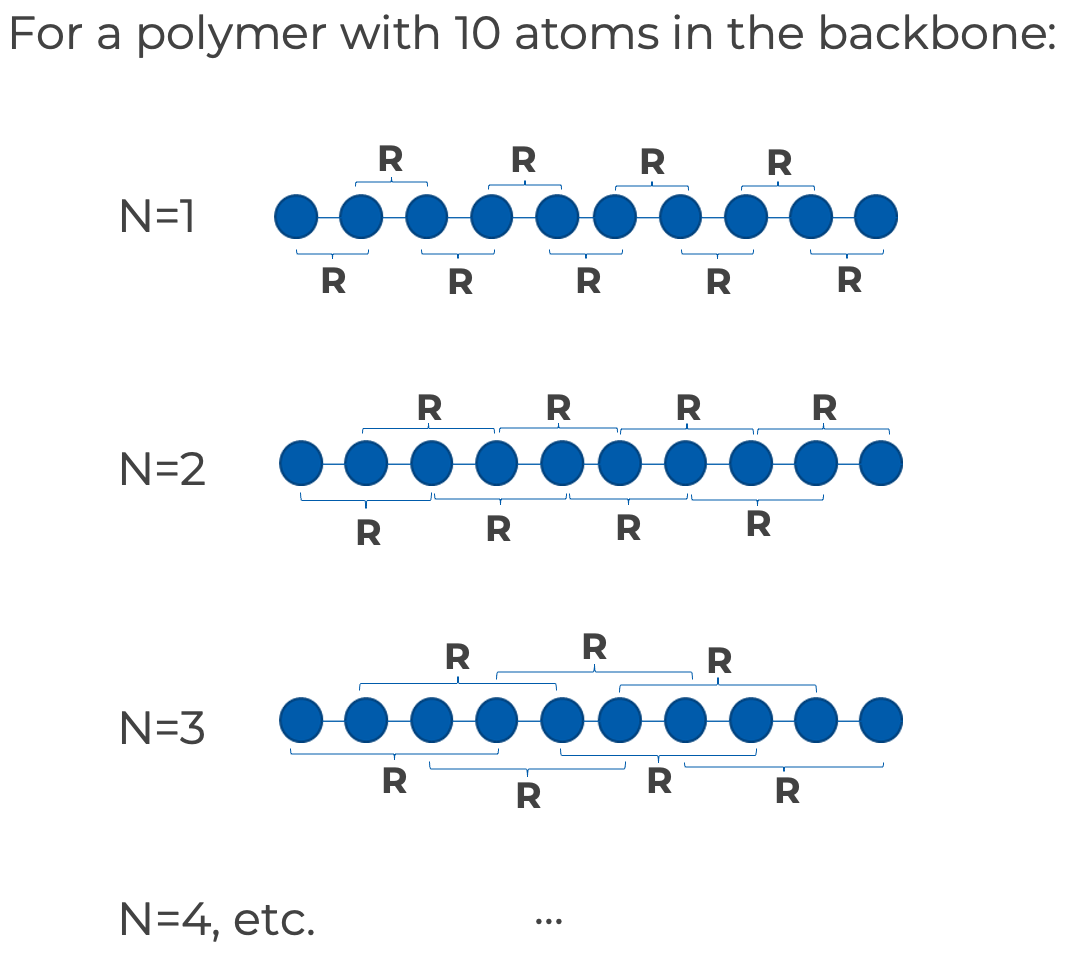
You can choose to calculate the internal mean square atom-to atom distances along the backbones of the selected chains. For a given segment length N (number of bonds), internal distance R of each segment is determined. The squared differences of these distances are then averaged over the total number of segments to give the mean square internal distance ⟨R2⟩/N.
The graphic shows how internal distances are defined at different segment lengths N for a polymer with 10 atoms in the backbone.
In the panel, you can choose the segment length interval at which the internal distance is calculated using the Step size for segment length text box. For example,
- at step size=1, the internal distance at N=1,2,3,... is calculated
- at step size=2, the internal distance at N=1,3,5... is calculated
- at step size=3, the internal distance at N=1,4,7... is calculated
You can plot the mean square internal distance against the segment length in the Polymer Chain Analysis Viewer Panel.
Other properties
The radius of gyration and the fractional anisotropy of the inertia tensor are calculated for each selected chain. Orientational order parameters are also calculated for the principal inertial axis. This is done by evaluating the angle between the principal axes of each pair of molecules and calculating the Legendre polynomials of even order up to 6 for the angle. The average over all pairs is taken to produce the orientational order parameters. For a given molecule, the average is taken over pairs with all other molecules. The distribution of these properties can be analyzed in the Polymer Chain Analysis Viewer Panel.
Using the Polymer Chain Analysis Panel
To visualize the results of an analysis, you can use the Polymer Chain Analysis Viewer Panel (click the Tasks button and browse to Materials → Classical Mechanics → Trajectory Analysis → Polymer Chain Analysis Results). To open this panel from the entry group for the results of a job .
.
To write out the input file and a script for running the job from the command line, click the arrow next to the Settings button  and choose Write.
Polymer Chain Analysis Panel Features
- Use structures from option menu
- Open Project Table button
- End-to-end distance section
- Molecule section
- Job toolbar
- Status bar
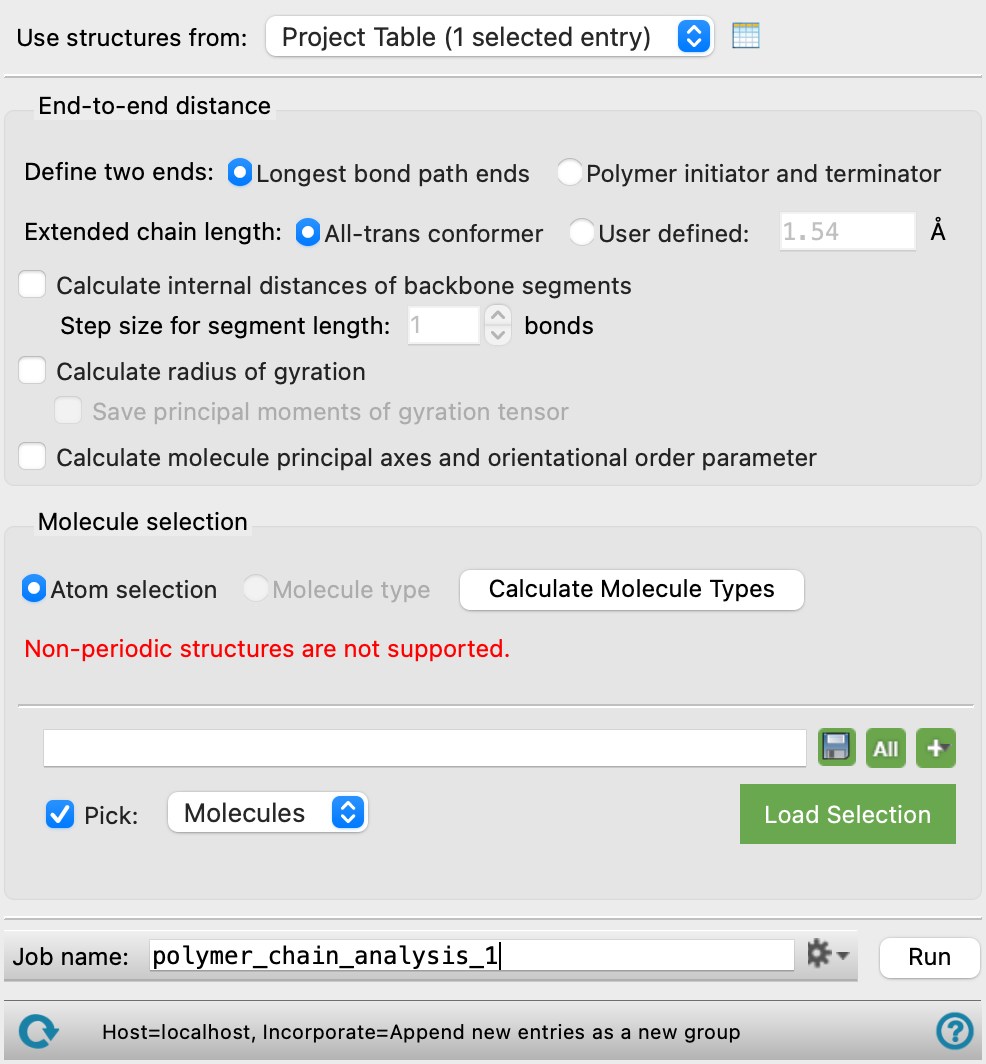
- Use structures from option menu
-
Choose the structure source for the polymer chain analysis. Each structure must be the output from a Desmond simulation that has an associated trajectory.
- Project Table (n selected entries)—Use the entries that are currently selected in the Project Table or Entry List. The number of entries selected is shown on the menu item.
- Workspace (n included entries)—Use the entries that are currently included in the Workspace, treated as separate structures. The number of entries in the Workspace is shown on the menu item.
- Project Table (n selected entries)—Use the entries that are currently selected in the Project Table or Entry List. The number of entries selected is shown on the menu item.
- Open Project Table button
-
Open the Project Table panel, so you can

- End-to-end distance section
-
Choose options for the definition of the chain ends that define the end-to-end distance and the extended chain length.
- Define two ends options
-
Define the ends to be used for the end-to-end distance.
-
Longest bond path ends—define the ends as the termini of the longest bond path in the molecule.
-
Polymer initiator and terminator—define the ends as the centers of mass of the initiator and terminator fragments of the polymer.
-
- Extended chain length options
-
Select an option to define the length of the fully extended chain.
-
All-trans conformer—computes the extended chain length from the length of a spline fit to the backbone atom positions in the all-trans conformer.
-
User defined—enter the length of the extended chain in angstroms in the text box.
-
- Calculate internal distances of backbone segments option
-
Calculate the end-to-end distances for chain backbone segments over a range of lengths (number of bonds). For each number of bonds defining a segment length, the squared differences are averaged for each occurrence of the segment length in all chains. See Internal distance for more information.
- Step size for segment length N bonds text box
-
Specify the increment in the number of backbone bonds used to define the segment lengths. The internal distance is calculated for each of these segment lengths. See Internal distance for more information.
- Calculate radius of gyration option
-
Calculate the radius of gyration for each chain, and average it over chains. The radius of gyration can be analyzed over the trajectory.
- Save principal moments of gyration tensor option
-
Save the principal moments of the radius of gyration tensor (as defined in Gyration_tensor) for each chain and each trajectory frame to a CSV file named
jobname_gyration_tensor.csv.
- Calculate molecule principal axes and orientational order parameter option
-
Calculate the orientational order parameter for the principal axes of inertia for each chain, and average over chains. The order parameter can be analyzed over the trajectory.
- Molecule section
-
Specify the set of molecules in the input structures for which the persistence length is calculated and averaged. This is done by picking or choosing a single polymer molecule type. The calculation for a given input structure includes all polymer molecules in the structure that were built from a given choice of monomers (e.g. ethylene and styrene). They might not have the same empirical formula, but they are instances of a particular type of polymer or copolymer. The set must have more than one molecule in it for order parameter calculations.
If you have selected multiple entries as input structures, you should make sure that any molecule selection is valid for all structures, otherwise the jobs may fail. There are two options for specifying the molecules.
- Atom selection option
-
Specify the molecule by picking in the Workspace or using the standard picking controls, shown below this option. You must pick entire molecules: partially selected molecules are not included in the calculation of persistence length.
- Molecule type option and menu or button
-
Specify the molecule type by choosing the polymer name or chemical formula for the molecule from the option menu. Initially, and when the structure source is changed, the menu is replaced by a Calculate Molecule Types button. When you click this button, the name or formula for each molecule is generated (details), and the button is replaced with the menu. Each item displays the name or formula and the number of molecules with that name or formula. If multiple input structures are selected, it is assumed that they have a similar composition, so that the molecule types are valid for all structures.
- Job toolbar
-
Manage job submission and settings. See Job Toolbar for a description of this toolbar.
The Job Settings button opens the Polymer Chain Analysis - Job Settings Dialog Box, where you can make settings for running the job.
- Status bar
-
The status bar displays information about the current job settings and status for the panel. The settings includes the job name, task name and task settings (if any), number of subjobs (if any) and the host name and job incorporation setting. The job status can include messages about job start, job completion and incorporation.
Use the Reset button
 to reset the panel to its default settings and clear any data from the panel.
 The status bar also contains the Help button
 , which opens the help topic for the panel in your browser. If the panel is used by one or more tutorials, hovering over the Help button displays a
  button, which you can click to display a list of tutorials (or you can right-click the Help button instead). Choosing a tutorial opens the tutorial topic.