FEP+ Web Services Job Table Panel
Submit and Monitor jobs run using FEP+ Web Services.
To open this panel, do one of the following:
- Click the Tasks button and browse to Free Energy Perturbation → FEP+ Web Services Monitor
- Click the Tasks button and browse to FEP+ → FEP+ Web Services Monitor
- Click the Tasks button and browse to Desmond → FEP+ Web Services Monitor
- Click the Tasks button and browse to Lead Optimization → Free Energy Perturbation → FEP+ Web Services Monitor
- Select the Submit to Web Services option and click Submit in the FEP+ Panel, FEP Solubility Panel, FEP Protein Mutation Panel, or Protein FEP for Ligand Selectivity Panel
- Using
- Features
- Additional Resources
Using the FEP+ Web Services Job Table Panel
Submitting Jobs
After setting up an FEP+ job using the FEP+ Panel, you can submit the job using FEP+ Web Services. Jobs set up from the FEP Solubility Panel, FEP Protein Mutation Panel, Protein FEP for Ligand Selectivity Panel, or Protein Constant pH Simulations Panel can also be submitted with Web Services.
Jobs submitted using FEP+ Web Services have an upper limit of 40,000 atoms on the unsolvated system. This results in a limit of approximately 500,000 atoms for the fully solvated system.
A job submitting using FEP+ Web Services uses 1/750 credits per ns of simulation per lambda per leg. For example, an edge for a typical small molecule FEP+ calculation consists of two legs, 12 lambdas per leg, and runs for 5 ns. For this simulation, the compute cost would be (5 ns * 12 lambdas * 2 legs) / 750 = 120/750 credits. Extending an edge will incur a charge for the additional computation time. Adding a node costs 2/3 of a credit. There is no limit on the number of edges connected to a node. There is a total simulation time limit of 25 ns per edge. The amount of credits used with the OPLS5 Force Field is double that of the OPLS4 Force Field.
The Total credits available in all projects text in the FEP+ Web Services Job Table Panel displays the credits available to you.
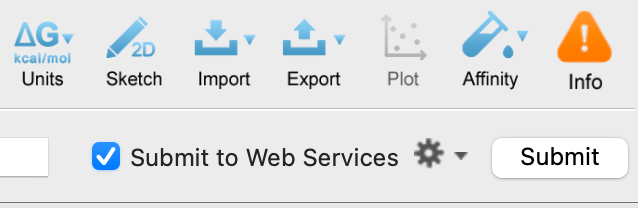
Set up the relevant job in the FEP+ Panel, FEP+ Protocol Builder Panel, FEP Solubility Panel, FEP Protein Mutation Panel, Protein FEP for Ligand Selectivity Panel, FEP Solubility Panel, or Protein Constant pH Simulations Panel.
Select the Submit to Web Services option from the Job toolbar and click Submit.
The number of credits to be used and the credits available are reported in a dialog box. Upon confirmation of the credit usage for the job, the job is uploaded. If you have access to multiple Web Services projects, you are prompted to choose the project to associate the job with.
The FEP+ Web Services Job Table opens, and the job shows an "uploading" status in the Job status column of the Job Table.
Monitoring Jobs
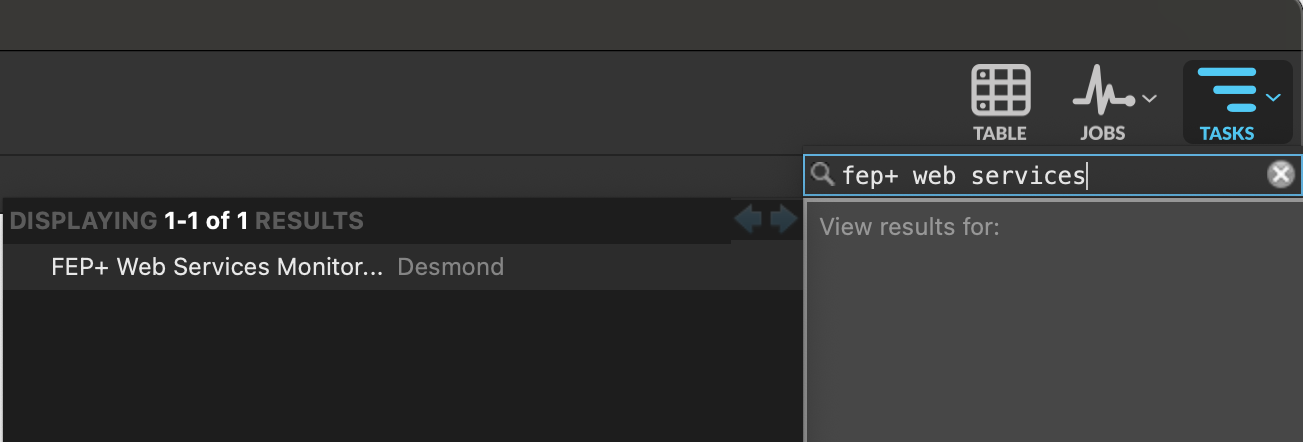
To open the FEP+ Web Services Job Table Panel to monitor jobs, click the Tasks button and browse to Free Energy Perturbation → FEP+ Web Services Monitor . You can also search for "fep+ web services" in the Tasks menu.
Jobs that are running display a progress bar.
Click the Refresh link to update the Job Table.
Downloading Results
Once the job has finished, select one or more rows and click the Download link menu to download the job results. Choose Primary File to download just the output fmp file, or All Files to download both the fmp file and the fmpdb file (trajectory data).
The output files can be opened using the FEP+ Panel.
The job can also be downloaded directly from the FEP+ panel by selecting Web Services from the Import structures or perturbation map from option menu. Click the Download button and choose a location to save the file. The FEP+ Panel — Analysis Tab opens once the file finishes downloading.
FEP+ Web Services Job Table Panel Features
- Job Table
-
Displays the jobs submitted to FEP+ Web Services and their status. Click on a column header to sort the table by that header.
-
-
Job name—Name of the job specified in the Job toolbar of the FEP+ Panel
-
Job status—The status of the job. This can be "uploading", "running", or "finished". Running jobs display a progress bar. You can click on the Job status cell of a running job to download the
fmpfile. You can click on the Job status cell of a finished job to download the outputfmpfile and trajectory data (*.fmpdb). -
Date submitted—The date and time when the job was submitted.
-
- Total credits available in all projects text
-
Displays the number of available credits out of the total number of credits for project.
-
Jobs submitted to FEP+ Web Services uses 1/750 credits per ns of simulation per lambda per leg. For example, an edge for a typical small molecule FEP+ calculation consists of two legs, 12 lambdas per leg, and runs for 5 ns. For this simulation, the compute cost would be (5 ns * 12 lambdas * 2 legs) / 750 = 120/750 credits. Extending an edge will incur a charge for the additional computation time. Adding a node costs 2/3 of a credit. There is no limit on the number of edges connected to a node. There is a total simulation time limit of 25 ns per edge.
- Delete link
-
Select one or more rows and click on the Delete link to delete the job.
- Download link menu
-
Select one or more rows and click the Download link menu to download the job results. The menu provides two options:
- Primary File—Download just the output
fmpfile. - All Files—Download both the output
fmpfile and thefmpdbfile (trajectory data).
- Primary File—Download just the output
- Refresh link
-
Click the Refresh link to update the Job Table with recent job progress.