Polymer Descriptors Panel
Calculate topological fingerprints and descriptors for polymers, which can be used in machine learning.
To open this panel: click the Tasks button and browse to Materials → Informatics → Polymer.
To write out the input file and a script for running the job from the command line, click the arrow next to the Settings button  and choose Write.
The following licenses are required to use this panel: MS Maestro, MS Informatics
- Features
- Additional Resources
Polymer Descriptors Panel Features
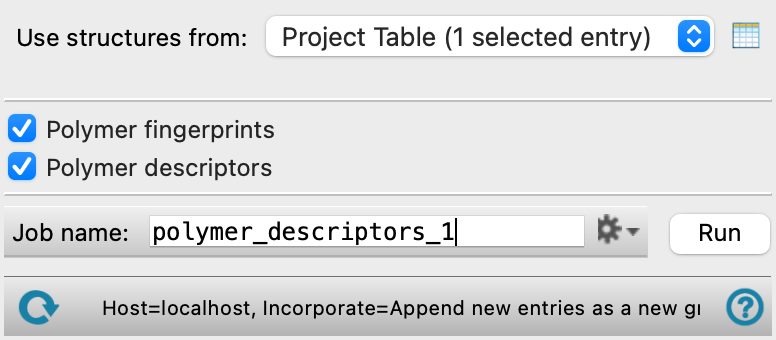
- Use structures from option menu
-
Choose the structure source for for generation of descriptors.
- Project Table (n selected entries)—Use the entries that are currently selected in the Project Table or Entry List. The number of entries selected is shown on the menu item.
- Workspace (n included entries)—Use the entries that are currently included in the Workspace, treated as separate structures. The number of entries in the Workspace is shown on the menu item.
- File—Use the specified file. When this option is selected, the File name text box and Browse button are displayed.
- Project Table (n selected entries)—Use the entries that are currently selected in the Project Table or Entry List. The number of entries selected is shown on the menu item.
- Open Project Table button
-
Open the Project Table panel, so you can

- File name text box and Browse button
-
Enter the file name in this text box, or click Browse and navigate to the file. The name of the file you selected is displayed in the text box.
- Polymer fingerprints option
-
Calculate 427 topological torsion fingerprints. A topological torsion is a linear sequence of four consecutively bonded non-hydrogen atoms, each defined by its atom type, the number of bonds to other non-hydrogen atoms attached to it, and its number of π-electron pairs [33].
- Polymer descriptors option
-
Calculate the following fingerprints:
-
Ring atoms fraction—fraction of atoms that are part of one aromatic ring
-
Double ring atoms fraction—fraction of atoms that are part of two aromatic rings
-
Tripe ring atoms fraction—fraction of atoms that are part of three aromatic rings
-
Backbone atoms fraction—fraction of atoms that are part of the polymer backbone
-
Rotatable bonds fraction—fraction of bonds that are rotatable
-
Sp3 atoms fraction—fraction of atoms that are sp3 hybridized
-
- Job toolbar
-
Manage job submission and settings. See Job Toolbar for a description of this toolbar.
The Job Settings button opens the Polymer Descriptors - Job Settings Dialog Box, where you can make settings for running the job.
- Status bar
-
 to reset the panel to its default settings and clear any data from the panel.
If you can submit a job from the panel, the status bar displays information about the current job settings and status for the panel. The settings include the job name, task name and task settings (if any), number of subjobs (if any) and the host name and job incorporation setting. The job status can include messages about job start, job completion and incorporation.
The status bar also contains the Help button
 , which opens an option menu with choices to open the help topic for the panel (Documentation), launch Maestro Assistant, or if available, choose from an option menu of Tutorials. If the panel is used by one or more tutorials, hover over the Tutorials option to display a list of tutorials. Choosing a tutorial opens the tutorial topic.